
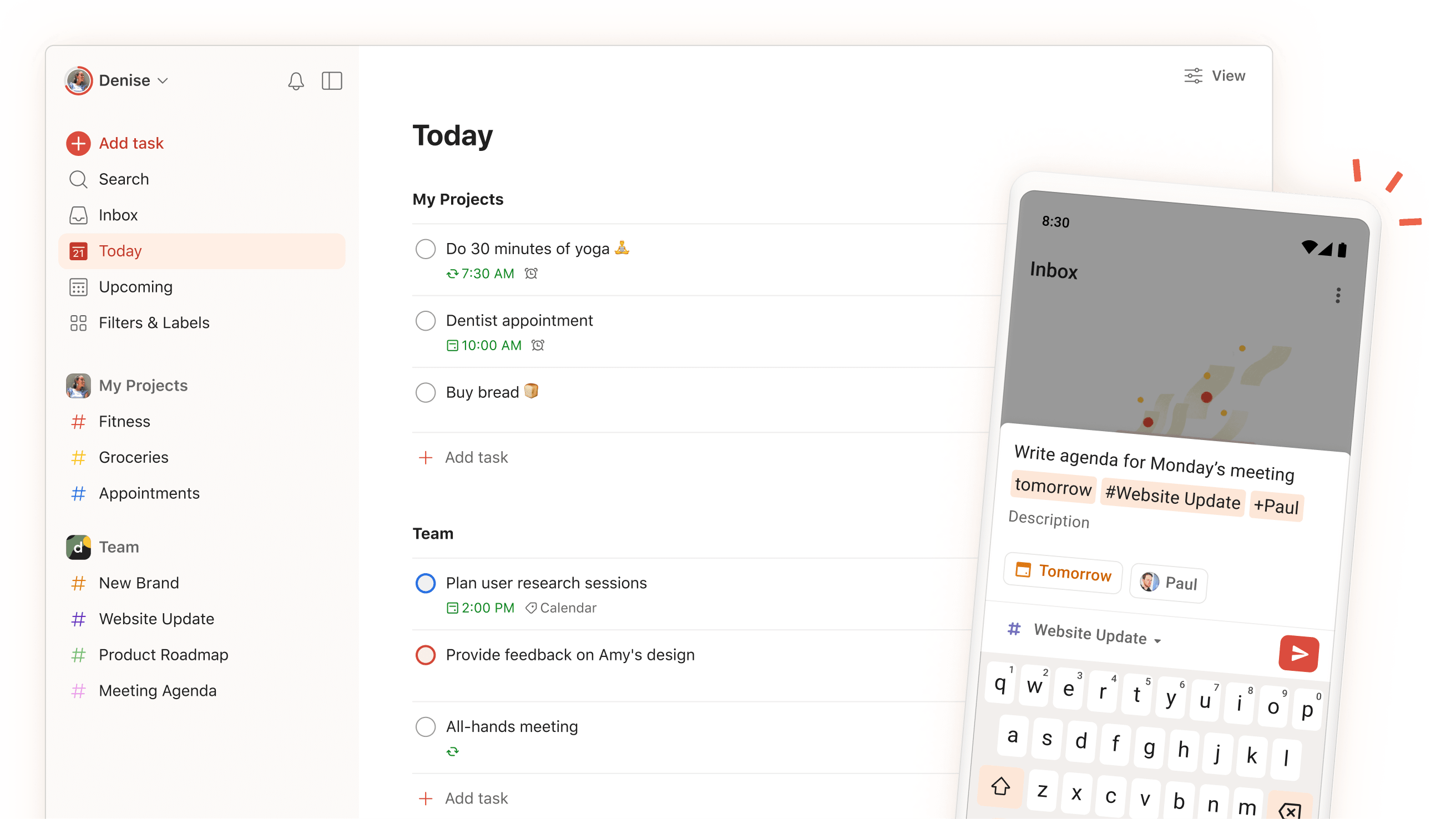
What is Todoist? Ultimate Guide to Smart Task Management
In today’s fast-paced world, staying organized isn’t just about keeping a simple to-do list anymore. Todoist has emerged as the world’s leading task management solution, helping millions of individuals and teams transform how they organize their work and personal lives. But what exactly makes Todoist stand out in a crowded field of productivity apps?
Understanding Todoist’s Core Features
At its heart, Todoist is more than just a digital checklist. It’s a comprehensive task management system that combines simplicity with powerful features designed to help you get things done efficiently.
Essential Functions
- Task creation and organization
- Project management
- Priority levels
- Due dates and reminders
- Collaborative features
Getting Started with Todoist
Basic Setup Process
- Create your account
- Set up your first project
- Add tasks and subtasks
- Organize with labels and filters
- Customize your workflow
Interface Navigation
The clean, intuitive interface includes:
- Quick add task button
- Project sidebar
- Today and Upcoming views
- Filter options
- Search functionality
Explore our productivity solutions
Advanced Task Management
Smart Task Organization
Todoist’s intelligent features include:
- Natural language input
- Recurring task settings
- Priority levels (P1-P4)
- Custom labels
- Nested subtasks
Project Structure
Organize your work effectively:
- Multiple project levels
- Sections within projects
- Color coding
- Project templates
- Archive functionality
Team Collaboration Features
Shared Workspace Management
Enable effective team coordination:
- Task delegation
- Comment threads
- File attachments
- Activity tracking
- Team inbox
Permission Controls
Maintain proper access levels:
- Role-based permissions
- Sharing settings
- Guest access
- Admin controls
Learn about our team solutions
Integration Capabilities
App Connectivity
Todoist works seamlessly with:
- Calendar apps
- Email clients
- Cloud storage
- Communication tools
- Time tracking apps
Automation Options
Streamline your workflow:
- Custom integrations
- Webhook support
- API access
- Third-party automation tools
Productivity Features
Task Prioritization
Stay focused on what matters:
- Priority flags
- Due dates
- Custom filters
- Smart scheduling
- Today view
Progress Tracking
Monitor your productivity:
- Karma points system
- Productivity trends
- Completion statistics
- Goal tracking
- Visual reports
Mobile and Cross-Platform Access
Device Compatibility
Access your tasks anywhere:
- iOS and Android apps
- Web interface
- Desktop applications
- Browser extensions
- Offline mode
Synchronization
Stay updated across devices:
- Real-time syncing
- Offline access
- Change history
- Conflict resolution
Premium Features Worth Noting
Advanced Capabilities
Upgrade your experience with:
- Unlimited activity history
- Custom themes
- Automatic backups
- Location-based reminders
- Calendar sync
Business Features
Enterprise-level tools include:
- Team billing
- Admin controls
- Priority support
- Advanced integrations
- Security features
Best Practices for Todoist Success
Task Management Tips
Optimize your workflow:
- Use natural language input
- Implement the 2-minute rule
- Review tasks regularly
- Set realistic due dates
- Utilize labels effectively
Project Organization
Keep your projects structured:
- Create clear hierarchies
- Use consistent naming
- Archive completed projects
- Regular cleanup
- Template utilization
Common Questions About Todoist
Is Todoist really free? Yes, Todoist offers a robust free plan with essential features. Premium features are available through paid subscriptions.
Can I use Todoist offline? Yes, Todoist works offline with synchronization when you reconnect.
How many projects can I create? Free users can create up to 5 active projects, while Premium users get unlimited projects.
Is Todoist secure? Yes, Todoist uses industry-standard security measures to protect your data.
Maximizing Your Productivity with Todoist
Getting Started Guide
- Download the app
- Create your first project
- Import existing tasks
- Set up integrations
- Customize your workflow
Advanced Usage Tips
- Use filters effectively
- Implement GTD methodology
- Create custom views
- Utilize keyboard shortcuts
- Regular task review
Transform Your Task Management Today
Ready to take control of your tasks and boost your productivity? Todoist offers the perfect blend of simplicity and power to help you achieve more.
