
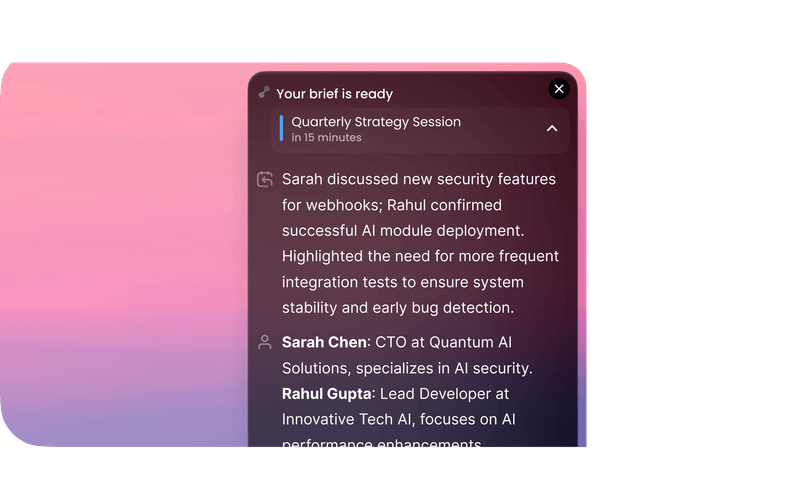
What is timeOS? The First Time-Aware AI for Your Daily Workflows
In an era where time management is crucial for productivity, timeOS emerges as a groundbreaking solution that integrates artificial intelligence directly into your daily workflows. This innovative platform is designed to enhance your efficiency by summarizing meetings, conducting follow-ups, and even scheduling and attending meetings on your behalf. With timeOS, you can reclaim your time and focus on what truly matters in your professional life.
Understanding timeOS
timeOS is not just another productivity tool; it’s the first time-aware AI that seamlessly integrates into your existing workflows. By leveraging advanced AI technology, timeOS helps users manage their time more effectively, ensuring that they stay organized and productive throughout the day.
The Need for Time-Aware Solutions
As the modern workplace evolves, the demands on professionals continue to grow. Here are some reasons why time-aware solutions like timeOS are becoming essential:
- Increased Workload: With the rise of remote work and digital communication, professionals are often overwhelmed with meetings, emails, and tasks.
- Distractions: The digital landscape is filled with distractions that can derail focus and productivity.
- Inefficient Time Management: Many professionals struggle to allocate their time effectively, leading to missed deadlines and increased stress.
Key Features of timeOS
timeOS offers a suite of features designed to streamline your workflows and enhance your productivity. Here are some of the standout features that make timeOS a game-changer:
Meeting Summarization
One of the most valuable features of timeOS is its ability to summarize meetings. After a meeting concludes, timeOS generates concise summaries that highlight key points, decisions made, and action items. This feature ensures that you never miss important information and can easily refer back to discussions without sifting through lengthy notes.
Automated Follow-Ups
Following up after meetings is crucial for maintaining momentum and ensuring that tasks are completed. timeOS automates this process by sending follow-up emails or reminders based on the action items discussed during the meeting. This not only saves time but also helps keep everyone accountable.
Intelligent Scheduling
Scheduling meetings can be a time-consuming task, often involving back-and-forth communication to find a suitable time. timeOS simplifies this process by intelligently scheduling meetings for you. By analyzing your calendar and preferences, timeOS can propose optimal meeting times, reducing the hassle of coordinating schedules.
Attendance Management
With timeOS, you can automate your meeting attendance. The AI can join meetings on your behalf, taking notes and summarizing discussions. This feature is particularly useful for professionals who have overlapping commitments or need to manage multiple meetings simultaneously.
Integration with Existing Tools
timeOS seamlessly integrates with popular productivity tools and platforms, such as Google Calendar, Microsoft Outlook, and Slack. This integration ensures that you can incorporate timeOS into your existing workflows without disruption.
Customizable Workflows
Every professional has unique needs and preferences. timeOS allows users to customize their workflows, tailoring the AI’s functionalities to suit their specific requirements. Whether you need more focus on meeting management or task tracking, timeOS adapts to your style.
How to Get Started with timeOS
Getting started with timeOS is a straightforward process. Here’s a step-by-step guide to help you set up the platform and begin optimizing your workflows:
Step 1: Sign Up
Visit the timeOS websiteand sign up for an account. You can choose from various subscription plans based on your needs, including a free trial to explore the features.
Step 2: Connect Your Calendars
Once you’ve created your account, connect your calendars (Google Calendar, Outlook, etc.) to timeOS. This integration allows the AI to access your schedule and manage your meetings effectively.
Step 3: Customize Your Preferences
Take some time to customize your preferences within timeOS. Set your availability, preferred meeting durations, and any specific requirements for meeting summaries and follow-ups.
Step 4: Start Using timeOS
Begin using timeOS in your daily workflows. Let the AI handle meeting summaries, follow-ups, and scheduling while you focus on your core tasks. Monitor the AI’s performance and make adjustments as needed.
Step 5: Review and Optimize
Regularly review the summaries and follow-ups generated by timeOS. Use this feedback to optimize your workflows further and ensure that the AI is meeting your needs effectively.
Benefits of Using timeOS
Enhanced Productivity
By automating time-consuming tasks such as meeting summarization and scheduling, timeOS allows professionals to focus on their core responsibilities. This increased efficiency leads to higher productivity levels.
Improved Time Management
With timeOS handling scheduling and follow-ups, users can allocate their time more effectively. The AI’s insights help professionals prioritize tasks and manage their workloads better.
Reduced Stress
The automation of routine tasks reduces the mental load on professionals, leading to lower stress levels. With timeOS managing meetings and follow-ups, users can enjoy a more organized and less chaotic work environment.
Better Collaboration
timeOS enhances collaboration among team members by ensuring that everyone is on the same page. Automated follow-ups and meeting summaries keep everyone informed and accountable, fostering a culture of transparency and teamwork.
Real-World Applications of timeOS
For Professionals
Professionals across various industries can benefit from timeOS by streamlining their workflows and improving their time management. Whether you’re in sales, marketing, or project management, timeOS can help you stay organized and focused.
For Teams
Teams can leverage timeOS to enhance collaboration and communication. By automating meeting management and follow-ups, teams can work more efficiently and ensure that everyone is aligned on goals and tasks.
For Executives
Executives often have packed schedules filled with meetings and commitments. timeOS can help them manage their time more effectively, allowing them to focus on strategic decision-making rather than administrative tasks.
Frequently Asked Questions
Q: Is timeOS suitable for all types of professionals?
A: Yes, timeOS is designed for anyone looking to improve their time management and productivity, including professionals, teams, and executives.
Q: Can I integrate timeOS with my existing tools?
A: Yes, timeOS integrates seamlessly with popular productivity tools such as Google Calendar, Microsoft Outlook, and Slack.
Q: How does timeOS handle meeting summaries?
A: After a meeting, timeOS generates concise summaries that highlight key points, decisions made, and action items, ensuring you never miss important information.
Q: Is there a free trial available for timeOS?
A: Yes, timeOS offers a free trial, allowing users to explore its features before committing to a subscription plan.
Start Your Journey with timeOS Today
Are you ready to revolutionize your time management and productivity? timeOS is here to help you streamline your workflows, automate routine tasks, and focus on what truly matters. Don’t let time slip away; start using timeOS today to transform your professional life!
