
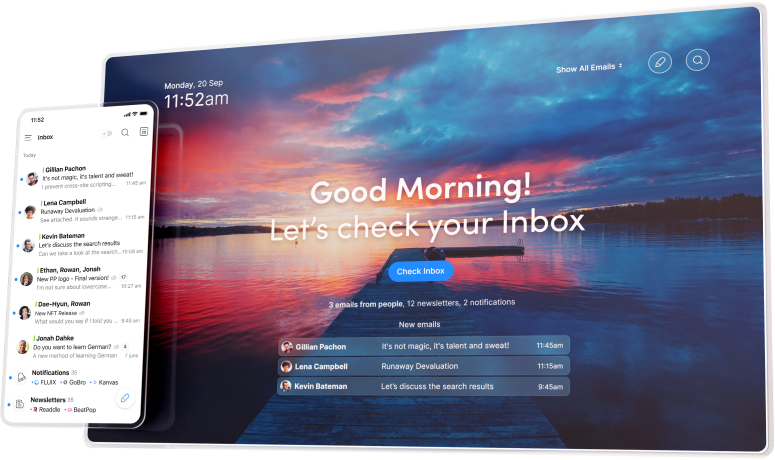
What is Spark? Take Control of Your Inbox with Smart Email Management
In today’s fast-paced digital world, managing your email effectively is more important than ever. With countless messages flooding our inboxes daily, it can be overwhelming to keep track of what’s important and what can be ignored. Enter Spark, an innovative email client designed to help you take control of your inbox. With its smart features and user-friendly interface, Spark allows you to instantly see what matters most and quickly clean up the rest. Additionally, Spark for Teams enhances collaboration by enabling users to create, discuss, and share emails with colleagues seamlessly. In this article, we’ll explore what Spark is, its key features, and how it can transform your email experience.
The Need for Effective Email Management
Email has become a primary mode of communication for both personal and professional interactions. However, the sheer volume of emails can lead to cluttered inboxes, missed messages, and decreased productivity. Here are some common challenges users face with traditional email management:
Information Overload
With promotional emails, newsletters, and personal messages all vying for attention, it’s easy to feel overwhelmed by the amount of information in your inbox.Difficulty Prioritizing
Identifying which emails require immediate attention and which can wait is often a challenge, leading to important messages getting lost in the shuffle.Time-Consuming Cleanup
Regularly cleaning up your inbox can be a tedious task, especially when you have to sift through countless emails to find the ones that matter.Inefficient Collaboration
In team settings, sharing and discussing emails can be cumbersome, leading to miscommunication and delays in decision-making.
Spark addresses these challenges with a fresh approach to email management, providing users with the tools they need to regain control over their inboxes.
What Makes Spark Unique?
Spark stands out in the crowded email client market due to its focus on smart email management and collaboration. Here are some of the key features that set Spark apart:
1. Smart Inbox
Spark’s Smart Inbox automatically categorizes your emails into three sections: Personal, Notifications, and Newsletters. This intelligent sorting allows you to quickly identify important messages while filtering out less relevant content. With the Smart Inbox, you can focus on what truly matters without being distracted by unnecessary emails.
2. Email Snoozing
If you receive an email that requires your attention but can wait, Spark allows you to snooze it. This feature temporarily removes the email from your inbox and brings it back at a specified time, helping you maintain focus on your current tasks without losing track of important messages.
3. Quick Replies and Templates
Spark offers quick replies and customizable templates, enabling you to respond to common inquiries swiftly. This feature is particularly useful for busy professionals who need to manage their time effectively while maintaining communication.
4. Powerful Search Functionality
Finding specific emails can be a daunting task, especially in a crowded inbox. Spark’s powerful search functionality allows you to locate emails quickly using keywords, filters, and advanced search options. This feature ensures you can retrieve important information without wasting time.
5. Collaboration with Spark for Teams
Spark for Teams enhances collaboration by allowing users to create, discuss, and share emails with colleagues. This feature streamlines communication within teams, making it easier to collaborate on projects and share important information.
6. Integration with Other Tools
Spark integrates seamlessly with various productivity tools, including calendars, task managers, and cloud storage services. This integration allows you to manage your emails alongside other essential tools, enhancing your overall productivity.
How Spark Enhances Your Email Experience
By addressing the common pain points associated with traditional email management, Spark enhances the overall email experience in several ways:
1. Increased Productivity
With features like the Smart Inbox and email snoozing, Spark helps you prioritize your emails and focus on what’s important. This increased productivity can lead to better time management and improved work performance.
2. Streamlined Collaboration
Spark for Teams allows for seamless collaboration among colleagues. By enabling users to share and discuss emails, Spark reduces the friction often associated with team communication, leading to faster decision-making and improved project outcomes.
3. Reduced Clutter
The Smart Inbox feature significantly reduces clutter in your inbox, allowing you to focus on the emails that matter most. This organization helps prevent important messages from getting lost in the noise.
4. Enhanced Communication
With quick replies and customizable templates, Spark makes it easy to maintain effective communication with clients, colleagues, and contacts. This feature ensures that you can respond promptly without sacrificing quality.
Getting Started with Spark
If you’re ready to take control of your inbox with Spark, getting started is simple. Here’s how to set up your Spark account:
Download Spark
Visit the Spark websiteor download the app from the App Store or Google Play Store.Create Your Account
Follow the prompts to create your Spark account. You can sign up using your email address or connect with your existing Google or Apple account.Connect Your Email Accounts
Once your account is set up, connect your email accounts to Spark. The app supports various email providers, including Gmail, Outlook, and Yahoo.Explore the Features
Take some time to explore Spark’s unique features, including the Smart Inbox, email snoozing, and collaboration tools. Familiarizing yourself with these features will help you maximize your email management.Customize Your Settings
Spark allows you to customize various settings to suit your preferences. Adjust your notification settings, manage your email categories, and set up your templates for quick replies.Start Using Spark
With everything set up, you can start using Spark to manage your emails more efficiently and enjoy a clutter-free inbox.
Use Cases for Spark
Spark is suitable for a wide range of users, including:
- Busy Professionals: Streamline your email management and focus on important communications without the distraction of clutter.
- Remote Teams: Enhance collaboration and communication among team members with Spark for Teams.
- Freelancers and Entrepreneurs: Manage client communications effectively while maintaining a professional image.
- Students: Organize academic emails and notifications, ensuring you never miss important deadlines or updates.
No matter your role, Spark provides the tools you need to enhance your email experience.
FAQs About Spark
1. Is Spark free?
Spark offers a free version with essential features. There is also a premium version available with additional features for teams and businesses.
2. Can I use Spark with my existing email address?
Yes, Spark allows you to connect your existing email accounts, making it easy to transition to the new platform.
3. How does the Smart Inbox work?
The Smart Inbox automatically categorizes your emails into Personal, Notifications, and Newsletters, helping you prioritize important messages.
4. Is Spark secure?
Yes, Spark prioritizes user privacy and security, employing encryption and other security measures to protect your data.
Conclusion: Take Control of Your Inbox with Spark
In a world where email can often feel overwhelming, Spark offers a refreshing solution to email management. With its smart features, user-friendly interface, and collaboration tools, Spark empowers users to take control of their inboxes and focus on what truly matters. If you’re tired of dealing with cluttered inboxes and inefficient communication, it’s time to give Spark a try and experience the difference for yourself.
