
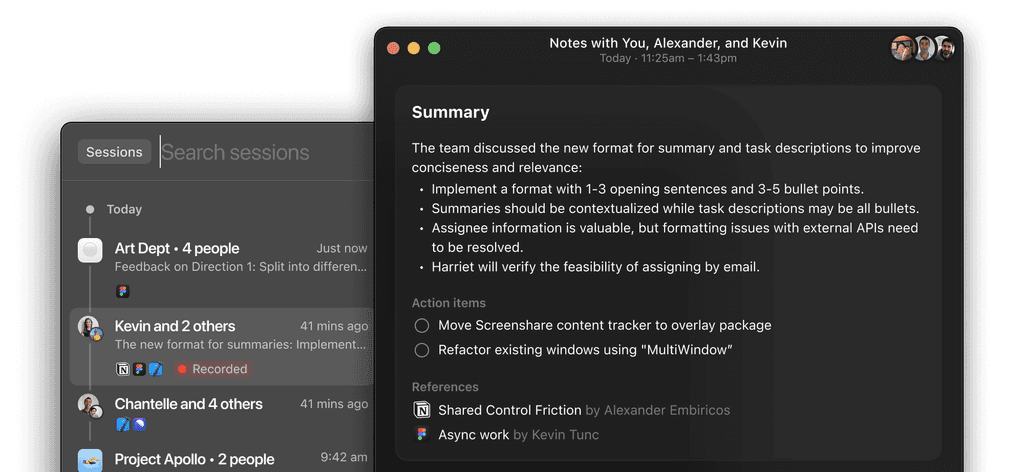
What is Remotion? The Ultimate Video App for Remote Collaboration
In an increasingly digital world, effective communication and collaboration are essential for remote teams. Remotion is a revolutionary video app designed specifically for remote collaboration, enabling teams to connect, communicate, and work together more efficiently. By fostering a culture of conversation and collaboration, Remotion helps teams move faster and achieve their goals. In this article, we will explore the features, benefits, and use cases of Remotion, and how it can transform the way your team collaborates remotely.
Understanding Remotion
Remotion is a video communication platform that focuses on enhancing remote collaboration. Unlike traditional video conferencing tools, Remotion is designed to create a more engaging and interactive environment for teams. It allows users to spark conversations and collaborate in real-time, making it easier to get work done, no matter where team members are located.
Key Features of Remotion
Seamless Video Communication: Remotion provides high-quality video and audio capabilities, ensuring that conversations are clear and engaging. The platform is optimized for performance, allowing for smooth interactions even in low-bandwidth situations.
Persistent Rooms: One of the standout features of Remotion is its persistent rooms. These virtual spaces allow teams to have ongoing conversations without the need to schedule formal meetings. Team members can drop in and out as needed, fostering a more natural flow of communication.
Integrated Collaboration Tools: Remotion integrates with various collaboration tools, such as project management software and document sharing platforms. This integration streamlines workflows and ensures that all team members have access to the resources they need.
Customizable Workspaces: Users can customize their virtual workspaces to suit their preferences. This personalization enhances the user experience and helps create a comfortable environment for collaboration.
Engagement Features: Remotion includes features designed to boost engagement, such as screen sharing, whiteboarding, and real-time chat. These tools facilitate brainstorming sessions and collaborative problem-solving.
Cross-Platform Compatibility: Remotion is accessible on various devices, including desktops, tablets, and smartphones. This flexibility ensures that team members can connect and collaborate from anywhere.
Getting Started with Remotion
Integrating Remotion into your remote collaboration strategy is a straightforward process. Here’s how to get started:
Step 1: Sign Up for Remotion
To begin, visit the Remotion websiteand sign up for an account. The registration process is quick and user-friendly, allowing you to create your profile in minutes.
Step 2: Set Up Your Workspace
Once registered, set up your virtual workspace. You can create persistent rooms for different teams or projects, making it easy for team members to connect and collaborate.
Step 3: Invite Team Members
Invite your team members to join Remotion. You can easily share links to your persistent rooms, allowing everyone to join the conversation.
Step 4: Start Collaborating
Begin using Remotion for your team’s communication needs. Utilize the video, chat, and collaboration features to enhance your remote work experience.
Advantages of Using Remotion
Remotion offers several advantages that make it an attractive choice for remote teams looking to improve their collaboration:
Enhanced Communication
By providing a platform for ongoing conversations, Remotion enhances communication among team members. The ability to drop in and out of persistent rooms fosters a more natural flow of dialogue, reducing the need for formal meetings.
Increased Productivity
With integrated collaboration tools and customizable workspaces, Remotion helps teams work more efficiently. The platform streamlines workflows, allowing team members to focus on their tasks without unnecessary distractions.
Flexibility and Accessibility
Remotion’s cross-platform compatibility ensures that team members can connect from anywhere, whether they are in the office, at home, or on the go. This flexibility is essential for modern remote work environments.
Improved Engagement
The engagement features offered by Remotion, such as screen sharing and whiteboarding, encourage active participation among team members. This interactivity enhances collaboration and fosters creativity.
Use Cases for Remotion
The versatility of Remotion makes it suitable for various applications across different industries. Here are some common use cases:
Remote Team Meetings
Remotion is ideal for remote teams looking to enhance their meeting experience. The persistent rooms allow for ongoing discussions, making it easier to stay connected and engaged.
Project Collaboration
Teams can use Remotion to collaborate on projects in real-time. The integration with project management tools ensures that everyone is on the same page and has access to the necessary resources.
Brainstorming Sessions
The whiteboarding and screen sharing features make Remotion an excellent choice for brainstorming sessions. Team members can share ideas and collaborate visually, fostering creativity and innovation.
Training and Onboarding
Remotion can be used for training and onboarding new employees. The platform allows for interactive sessions, making it easier for new hires to engage with their colleagues and learn about the company culture.
Technical Considerations
When implementing Remotion, it’s essential to consider several technical aspects to ensure optimal performance:
System Requirements
Remotion is a web-based application, making it accessible from any device with an internet connection. For the best experience, ensure that your browser is up to date.
Security Measures
Security is a top priority for Remotion. The platform incorporates several security features, including:
- Data Encryption: All data transmitted through Remotion is encrypted to protect user privacy.
- Access Controls: Administrators can manage user access and permissions, ensuring that sensitive information remains secure.
Best Practices for Using Remotion
To maximize your experience with Remotion, consider the following best practices:
Foster a Culture of Communication
Encourage team members to use the persistent rooms for casual conversations and collaboration. This culture of communication can lead to stronger relationships and improved teamwork.
Utilize Engagement Features
Take advantage of Remotion’s engagement features, such as screen sharing and whiteboarding, to enhance collaboration. These tools can help facilitate brainstorming sessions and problem-solving discussions.
Monitor Usage and Feedback
Regularly monitor how your team uses Remotion and gather feedback. This information can help you identify areas for improvement and optimize your remote collaboration strategy.
Frequently Asked Questions
Q: What makes Remotion different from other video conferencing tools?
A: Remotion focuses on fostering ongoing conversations through persistent rooms, allowing for a more natural flow of communication compared to traditional video conferencing tools.
Q: Can I use Remotion on mobile devices?
A: Yes, Remotion is accessible on various devices, including desktops, tablets, and smartphones, ensuring that team members can connect from anywhere.
Q: Is Remotion suitable for large organizations?
A: Absolutely! Remotion is designed to accommodate teams of all sizes, making it ideal for both small businesses and large enterprises.
Conclusion
As remote work continues to evolve, tools like Remotion are essential for enhancing collaboration and communication among teams. By providing a platform for ongoing conversations and integrating collaboration features, Remotion helps teams move faster and work more efficiently.
