
Discover OneSchema- Simplify Your CSV Data Management
In the world of data management, the ability to efficiently handle CSV files is crucial for businesses that rely on accurate data uploads. Whether you’re setting up new customers in a SaaS product or uploading a monthly catalog, ensuring that your data adheres to a specific schema can be a daunting task. This is where OneSchema comes into play. This innovative tool offers a super simple spreadsheet interface designed to detect and correct errors in CSV data, making the data upload process smoother and more efficient. In this article, we will explore what OneSchema is, how it works, and the benefits it provides to users.
Understanding OneSchema
OneSchema is a user-friendly tool that simplifies the process of managing CSV files. It is specifically designed for users who frequently upload data to systems with a known schema. By providing a straightforward interface, OneSchema allows users to easily identify and rectify errors in their CSV files before uploading them, reducing the likelihood of data-related issues.
Key Features of OneSchema
OneSchema stands out in the crowded field of data management tools due to its unique features. Here are some of the most notable:
Intuitive Spreadsheet Interface: OneSchema offers a familiar spreadsheet layout, making it easy for users to navigate and manage their data without a steep learning curve.
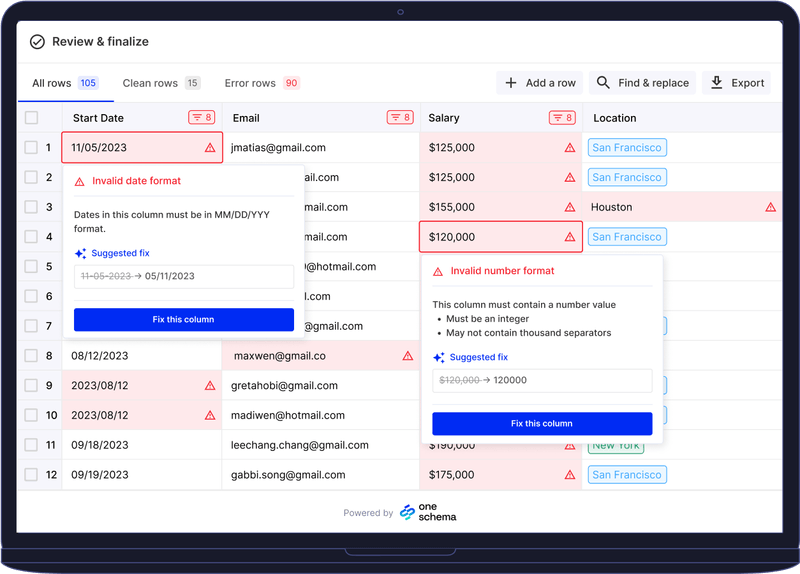
Error Detection and Correction: The tool automatically detects errors in your CSV files, such as missing values, incorrect data types, and formatting issues. It provides suggestions for correcting these errors, ensuring that your data meets the required schema.
Schema Validation: OneSchema allows users to define a schema for their data uploads. This feature ensures that all uploaded data adheres to the specified format, reducing the risk of errors during the upload process.
Bulk Uploads: Users can upload multiple CSV files at once, streamlining the data management process and saving valuable time.
Integration with Popular Platforms: OneSchema integrates seamlessly with various SaaS products and platforms, making it a versatile tool for businesses across different industries.
How OneSchema Works
To fully appreciate the capabilities of OneSchema, it’s essential to understand how it operates. The process is straightforward and involves a few key steps.
Step 1: Upload Your CSV File
The first step in using OneSchema is to upload your CSV file. The intuitive interface allows you to drag and drop your file or select it from your device. Once uploaded, OneSchema will automatically analyze the data.
Step 2: Review Error Reports
After the analysis, OneSchema generates an error report highlighting any issues found in your CSV file. This report includes details about missing values, incorrect data types, and any other discrepancies that may prevent a successful upload.
Step 3: Correct Errors
OneSchema provides suggestions for correcting the identified errors. Users can easily make adjustments directly within the spreadsheet interface. This feature allows for quick fixes without the need to reformat the entire file.
Step 4: Validate Against Schema
Once all errors have been addressed, OneSchema allows users to validate their data against the defined schema. This step ensures that the data is ready for upload and meets all necessary requirements.
Step 5: Download the Corrected CSV
After validation, users can download the corrected CSV file, ready for upload to their desired platform. This streamlined process saves time and reduces the frustration often associated with data management.
Benefits of Using OneSchema
The advantages of using OneSchema extend beyond just error correction. Here are some key benefits that users can expect:
Increased Efficiency
By automating the error detection and correction process, OneSchema significantly increases efficiency. Users can spend less time troubleshooting data issues and more time focusing on their core business activities.
Improved Data Quality
OneSchema helps ensure that the data being uploaded is accurate and adheres to the required schema. This improvement in data quality reduces the risk of errors that can lead to costly mistakes down the line.
User-Friendly Experience
The intuitive spreadsheet interface makes OneSchema accessible to users of all skill levels. Even those with limited technical expertise can navigate the tool and manage their data effectively.
Cost Savings
By reducing the time spent on data management tasks, OneSchema can lead to significant cost savings for businesses. Teams can allocate their resources more effectively, focusing on strategic initiatives rather than administrative tasks.
Seamless Integration
OneSchema’s ability to integrate with popular platforms makes it a versatile tool for businesses across various industries. This integration ensures that users can easily incorporate OneSchema into their existing workflows.
Use Cases for OneSchema
OneSchema is versatile and can be applied across various industries and functions. Here are some common use cases:
Customer Onboarding
For SaaS companies, setting up new customers often involves uploading CSV files with customer data. OneSchema simplifies this process by ensuring that the data is accurate and adheres to the required schema, making onboarding smoother and more efficient.
Monthly Catalog Uploads
Retailers and e-commerce businesses frequently need to upload product catalogs. OneSchema helps ensure that these catalogs are formatted correctly, reducing the risk of errors that could disrupt sales.
Data Migration
When migrating data from one system to another, ensuring that the data adheres to the new system’s schema is crucial. OneSchema facilitates this process by validating and correcting data before migration.
Reporting and Analytics
Accurate data is essential for effective reporting and analytics. OneSchema helps ensure that the data being used for analysis is correct, leading to more reliable insights and better decision-making.
Getting Started with OneSchema
If you’re ready to simplify your CSV data management and enhance your data upload processes, getting started with OneSchema is easy. Here’s a step-by-step guide:
Sign Up for an Account: Visit the OneSchema website and sign up for an account. Choose a plan that fits your needs.
Upload Your CSV File: Use the drag-and-drop feature to upload your CSV file to the OneSchema platform.
Review Error Reports: After the analysis, review the error report generated by OneSchema to identify any issues.
Correct Errors: Make the necessary corrections directly within the spreadsheet interface, following the suggestions provided by OneSchema.
Validate Against Schema: Validate your corrected data against the defined schema to ensure it meets all requirements.
Download the Corrected CSV: Once everything is in order, download the corrected CSV file, ready for upload to your desired platform.
Frequently Asked Questions
What types of errors can OneSchema detect?
OneSchema can detect a variety of errors, including missing values, incorrect data types, and formatting issues that may prevent successful uploads.
Is OneSchema suitable for small businesses?
Yes, OneSchema is designed to be user-friendly and accessible, making it suitable for businesses of all sizes, including small businesses.
Can I integrate OneSchema with my existing systems?
OneSchema integrates seamlessly with various SaaS products and platforms, allowing for easy incorporation into your existing workflows.
How does OneSchema ensure data security?
OneSchema prioritizes data security and employs encryption and secure authentication methods to protect your data.
Is there a free trial available for OneSchema?
Yes, OneSchema offers a free trial period, allowing you to explore its features and determine if it’s the right fit for your business.
Final Thoughts
OneSchema is revolutionizing the way businesses manage CSV data uploads. By providing a simple, intuitive interface for detecting and correcting errors, it empowers users to streamline their data processes and improve data quality. If you’re looking for a solution to simplify your CSV data management and ensure seamless uploads, OneSchema is the tool you need.
