
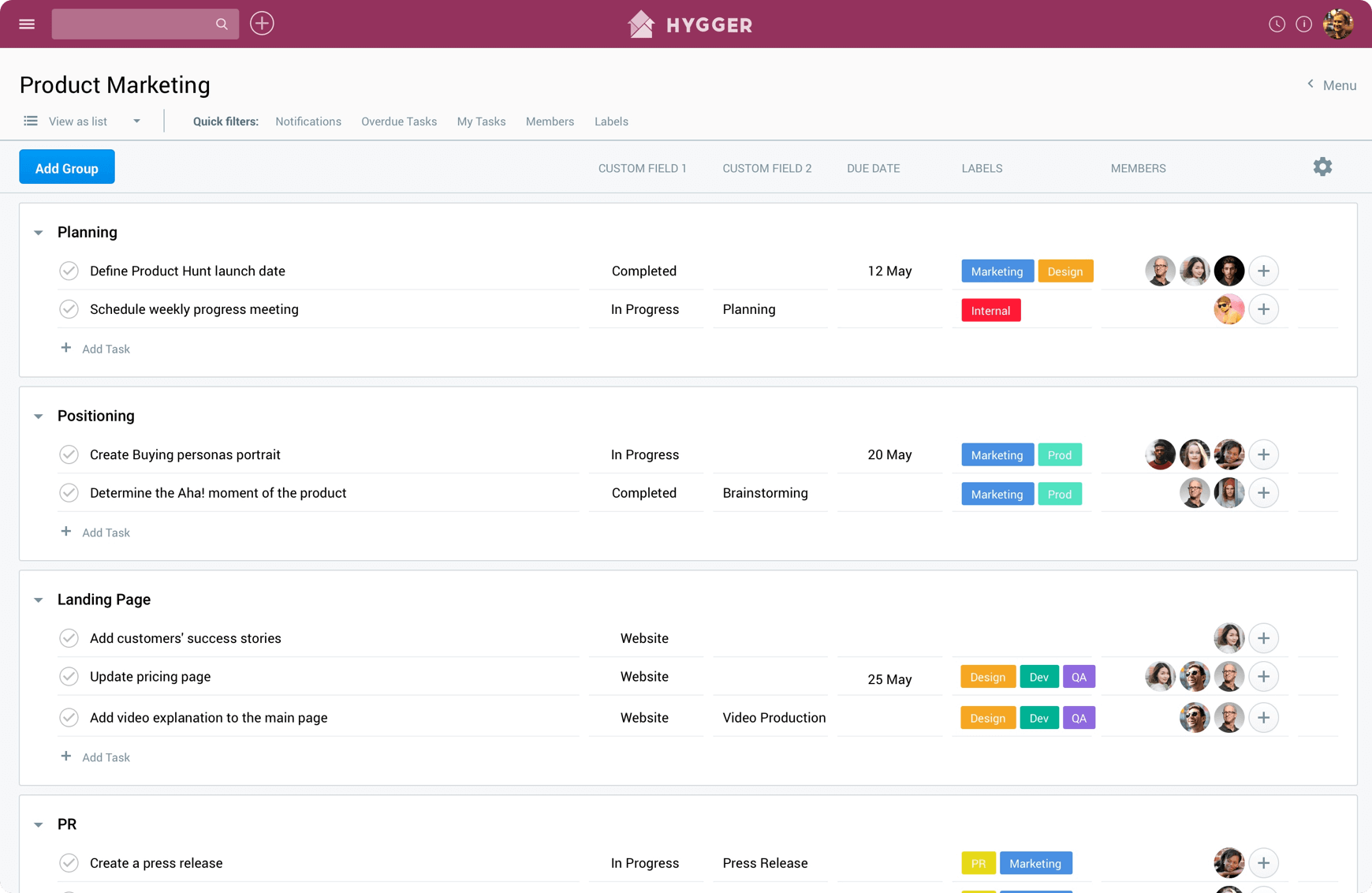
What is Hygger? The Simple Product Management Software for IT Teams
In the fast-paced world of software development, effective product management is crucial for success. Hygger is a simple yet powerful product management software designed specifically for IT teams. Built on Agile Scrum principles, Hygger offers a suite of tools that includes to-do lists, time tracking, Kanban boards, roadmap planning, sprints, and backlog management. This comprehensive platform helps teams streamline their workflows, enhance collaboration, and ultimately deliver high-quality products on time.
The Importance of Product Management in IT
Product management plays a vital role in the success of IT projects. It involves planning, developing, and managing products throughout their lifecycle. Here are some key reasons why effective product management is essential:
- Alignment with Business Goals: Product management ensures that the development process aligns with the overall business strategy, helping teams focus on delivering value to customers.
- Improved Collaboration: A well-defined product management process fosters collaboration among team members, ensuring that everyone is on the same page and working towards common goals.
- Efficient Resource Allocation: By prioritizing tasks and managing resources effectively, product management helps teams optimize their workflows and reduce waste.
- Enhanced Customer Satisfaction: Understanding customer needs and incorporating feedback into the development process leads to better products and higher customer satisfaction.
Key Features of Hygger
Hygger stands out in the crowded field of product management tools due to its user-friendly interface and robust feature set. Here are some of the key features that make Hygger a preferred choice for IT teams:
Agile Scrum Tools
Hygger is built on Agile Scrum principles, making it an ideal choice for teams that follow Agile methodologies. The platform supports Scrum practices, allowing teams to plan sprints, manage backlogs, and track progress effectively.
Kanban Boards
The Kanban board feature in Hygger provides a visual representation of tasks and workflows. Teams can easily move tasks between different stages of development, ensuring that everyone is aware of the current status of each task. This visual approach enhances transparency and collaboration.
Roadmap Planning
Hygger’s roadmap planning feature allows teams to outline their product vision and strategy. By creating a clear roadmap, teams can prioritize features, set timelines, and communicate their plans to stakeholders. This feature is essential for aligning development efforts with business goals.
Time Tracking
Effective time tracking is crucial for managing resources and ensuring that projects stay on schedule. Hygger offers built-in time tracking tools that allow team members to log their hours and monitor progress. This feature helps teams identify bottlenecks and optimize their workflows.
Backlog Management
Managing a product backlog is essential for prioritizing tasks and ensuring that the most important features are developed first. Hygger provides tools for backlog management, allowing teams to organize, prioritize, and refine their backlog items effectively.
To-Do Lists
Hygger includes a simple yet effective to-do list feature that helps team members stay organized and focused. Users can create tasks, set deadlines, and assign responsibilities, ensuring that everyone knows what needs to be done.
How to Get Started with Hygger
Getting started with Hygger is straightforward. Here’s a step-by-step guide to help you set up your account and begin managing your products effectively:
Step 1: Sign Up
Visit the Hygger websiteand sign up for a free trial. This allows you to explore the platform and its features without any commitment.
Step 2: Set Up Your Workspace
Once you’ve created your account, set up your workspace. This includes adding team members, creating projects, and defining workflows. A well-organized workspace will make product management more efficient.
Step 3: Create Your Product Roadmap
Start by outlining your product vision and strategy. Use Hygger’s roadmap planning feature to create a clear roadmap that aligns with your business goals. This will serve as a guide for your development efforts.
Step 4: Manage Your Backlog
Organize your product backlog by adding features, tasks, and user stories. Prioritize these items based on their importance and impact on your product. Hygger’s backlog management tools will help you keep everything organized.
Step 5: Plan Your Sprints
With your backlog in place, plan your sprints using Hygger’s Agile Scrum tools. Define the scope of each sprint, assign tasks to team members, and set deadlines. This structured approach will help you stay on track and meet your goals.
Step 6: Track Progress
Use Hygger’s time tracking and Kanban board features to monitor progress throughout the development process. Regularly review your tasks and adjust your plans as needed to ensure that you stay on schedule.
Benefits of Using Hygger
Enhanced Collaboration
Hygger fosters collaboration among team members by providing a centralized platform for communication and task management. This ensures that everyone is aligned and working towards common goals.
Improved Productivity
With its intuitive interface and powerful features, Hygger helps teams streamline their workflows and improve productivity. By reducing the time spent on administrative tasks, team members can focus on what matters most: delivering high-quality products.
Better Visibility
Hygger’s visual tools, such as Kanban boards and roadmaps, provide better visibility into the development process. This transparency helps teams identify bottlenecks and make informed decisions about resource allocation.
Increased Flexibility
Hygger’s Agile Scrum tools allow teams to adapt to changing requirements and priorities. This flexibility is essential in today’s fast-paced IT environment, where customer needs and market conditions can change rapidly.
Real-World Applications of Hygger
For Software Development Teams
Hygger is an invaluable tool for software development teams looking to implement Agile methodologies. By using Hygger, teams can manage their sprints, track progress, and deliver high-quality software on time.
For Product Managers
Product managers can leverage Hygger’s roadmap planning and backlog management features to align their development efforts with business goals. This ensures that the right features are prioritized and delivered to customers.
For IT Project Managers
IT project managers can use Hygger to monitor project timelines, allocate resources, and ensure that projects stay on track. The platform’s reporting features provide valuable insights into project performance.
Frequently Asked Questions
Q: Is Hygger suitable for all types of teams?
A: Yes, Hygger is designed for IT teams but can be adapted for use by any team looking to improve their product management processes.
Q: Can I use Hygger for free?
A: Hygger offers a free trial, allowing users to explore its features before committing to a paid plan.
Q: Does Hygger integrate with other tools?
A: Yes, Hygger integrates with various tools and applications, enhancing its functionality and usability.
Q: How does Hygger support Agile methodologies?
A: Hygger is built on Agile Scrum principles, providing tools for sprint planning, backlog management, and progress tracking.
Start Managing Your Products with Hygger Today
Are you ready to take your product management to the next level? Hygger is here to help you streamline your workflows, enhance collaboration, and deliver high-quality products on time. Don’t wait any longer; start using Hygger today to transform your product management practices!
