
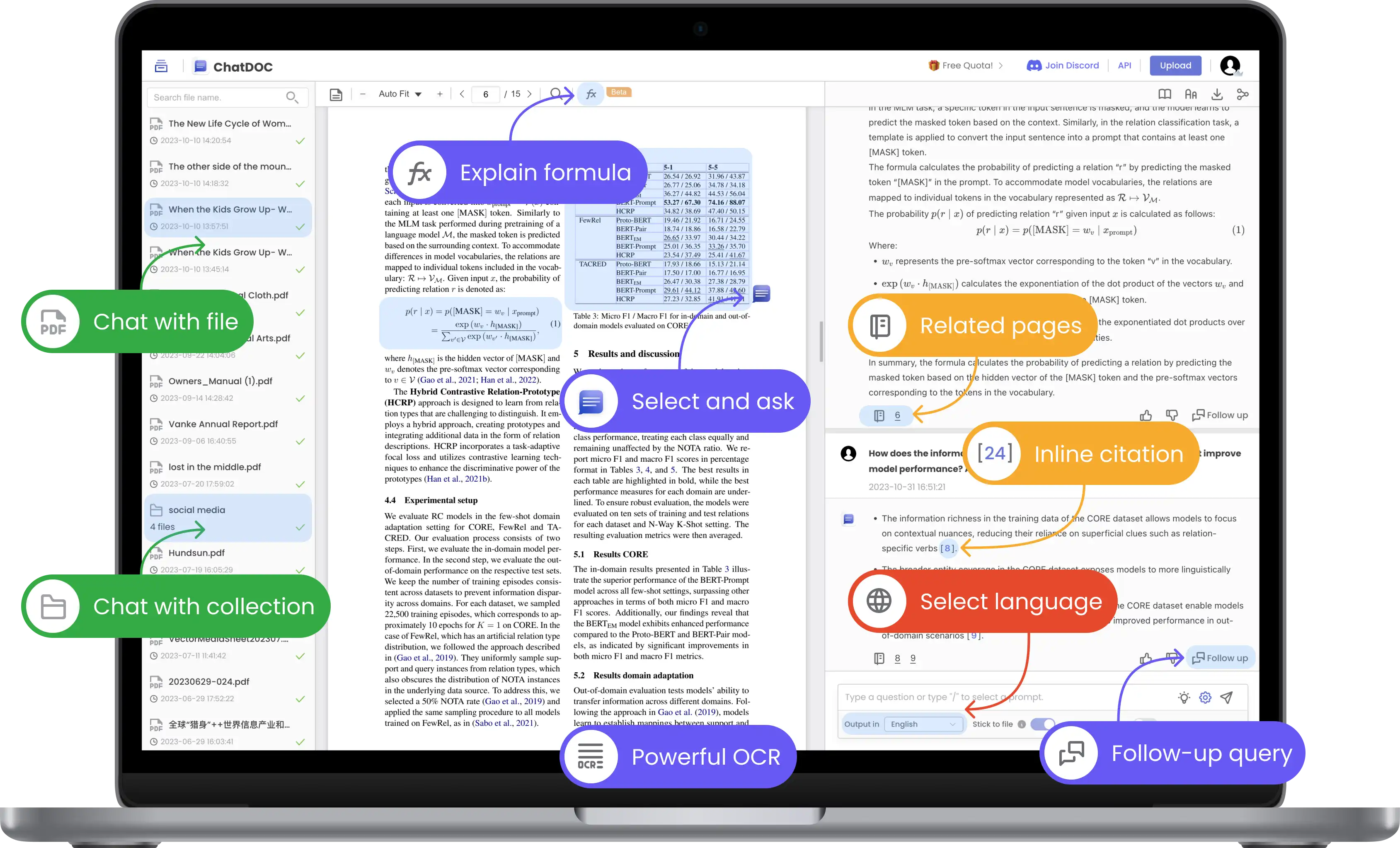
Discover ChatDOC- Your GPT for Any File
In an era where information is abundant yet often overwhelming, the ability to interact with documents in a meaningful way is invaluable. ChatDOC emerges as a revolutionary tool that allows users to engage with various file formats through conversational AI. Imagine being able to ask questions about a document and receive instant, accurate answers, complete with cited sources. This article delves into the features, benefits, and practical applications of ChatDOC, showcasing how it can transform the way you learn and interact with information.
The Challenge of Information Overload
As we navigate through vast amounts of data daily, the challenge of extracting relevant information becomes increasingly complex. Traditional methods of reading and analyzing documents can be time-consuming and inefficient. Whether you’re a student, researcher, or professional, the need for a more effective way to engage with documents is clear.
Common Issues with Document Interaction
Many individuals face challenges such as:
- Time Consumption: Reading through lengthy documents to find specific information can take hours.
- Lack of Context: Extracting information without understanding the context can lead to misinterpretation.
- Difficulty in Collaboration: Sharing insights from documents often requires additional tools or methods, complicating the process.
These challenges highlight the need for a solution that simplifies document interaction and enhances understanding. ChatDOC addresses these issues by providing a user-friendly interface that allows for dynamic engagement with documents.
Key Features of ChatDOC
ChatDOC is designed to facilitate seamless interaction with documents, offering a range of features that enhance the user experience. Here’s a closer look at what makes ChatDOC a standout tool:
Multi-Format Support
One of the primary advantages of ChatDOC is its ability to work with various file formats, including:
- PDFs: Easily chat with your PDF documents, extracting information without the need for manual searching.
- Word Documents: Engage with Word files to clarify concepts, summarize sections, or ask specific questions.
- Spreadsheets: Query tables and data in Excel files, allowing for targeted analysis and insights.
This multi-format support ensures that users can interact with a wide range of documents, making ChatDOC a versatile tool for any professional or academic setting.
Instant Answers with Cited Sources
With ChatDOC, users can ask questions and receive instant answers, complete with citations. This feature provides several benefits:
- Accuracy: By citing sources, ChatDOC ensures that users can verify the information provided, enhancing trust and reliability.
- Efficiency: Instant answers save time, allowing users to focus on analysis and application rather than searching for information.
Targeted Questioning
ChatDOC allows users to select specific tables or texts within documents and ask targeted questions. This functionality enables:
- Precision: Users can hone in on particular sections of a document, ensuring that their inquiries are relevant and focused.
- Depth of Understanding: By asking targeted questions, users can gain deeper insights into complex topics.
Multi-Round Conversations
Engaging in multi-round conversations is a unique feature of ChatDOC. This allows users to:
- Explore Topics in Depth: Users can dive deeper into a subject by asking follow-up questions, creating a thread of conversation that builds on previous inquiries.
- Clarify Concepts: If an answer raises further questions, users can continue the dialogue, fostering a more comprehensive understanding of the material.
Collection Summaries
ChatDOC also offers the ability to query across multiple files simultaneously, providing summarized answers in a collection format. This feature is particularly useful for:
- Comparative Analysis: Users can gather insights from various documents, making it easier to compare and contrast information.
- Holistic Understanding: Summarized answers help users see the bigger picture, integrating knowledge from multiple sources.
Benefits of Using ChatDOC
The advantages of using ChatDOC extend beyond its features. Here are some key benefits that make it a valuable tool for anyone who regularly engages with documents:
Enhanced Learning Experience
By facilitating interactive engagement with documents, ChatDOC enhances the learning experience. Users can ask questions, clarify doubts, and explore topics in a way that traditional reading cannot provide.
Increased Productivity
ChatDOC streamlines the process of information retrieval, allowing users to save time and focus on analysis rather than searching. This increased efficiency can lead to higher productivity levels in both academic and professional settings.
Improved Collaboration
For teams working on projects, ChatDOC simplifies collaboration by allowing multiple users to engage with the same documents. Insights can be shared easily, fostering a collaborative environment that enhances teamwork.
Greater Accessibility
With its user-friendly interface and multi-format support, ChatDOC makes information more accessible to a wider audience. Whether you’re a student, researcher, or professional, the tool caters to diverse needs and learning styles.
How to Get Started with ChatDOC
Getting started with ChatDOC is a straightforward process. Follow these steps to begin enhancing your document interaction experience:
Sign Up for an Account: Visit the ChatDOC websiteand create a free account. The platform offers various subscription options, including a free tier with essential features.
Upload Your Documents: Once your account is set up, upload the documents you wish to interact with. ChatDOC supports various formats, making it easy to get started.
Start Chatting: Begin asking questions about your documents. Use the chat interface to engage with the content, selecting specific sections or tables as needed.
Explore Multi-Round Conversations: Take advantage of the multi-round conversation feature to dive deeper into topics. Ask follow-up questions to clarify concepts and gain a better understanding.
Utilize Collection Summaries: If you’re working with multiple documents, use the collection feature to query across files and receive summarized answers.
Frequently Asked Questions
Is ChatDOC free to use?
ChatDOC offers a free tier with essential features. There are also premium plans available that provide additional functionalities for advanced users.
Can I use ChatDOC on mobile devices?
Yes, ChatDOC is accessible on various devices, including smartphones and tablets, allowing for flexible document interaction on the go.
How does ChatDOC compare to other document interaction tools?
ChatDOC stands out due to its conversational AI capabilities, multi-format support, and features like multi-round conversations and collection summaries. While other tools may focus on one aspect, ChatDOC combines multiple functionalities for a comprehensive experience.
Can I collaborate with others on ChatDOC?
Yes, ChatDOC allows users to share documents and insights, making it easy to collaborate on projects and discussions.
Is my data secure with ChatDOC?
ChatDOC takes user privacy and data security seriously. Your documents and interactions are stored securely, and you can manage your account settings to control your data.
Embrace a Better Way of Learning with ChatDOC
In a world where information is constantly evolving, having the right tools to engage with that information is essential. ChatDOC offers a unique solution that allows users to chat with documents, ask questions, and receive instant answers.
